I can inspect the selected workspace and explain its code. Build edits files directly, and can run a command after you approve the first one.
[[shield]]{{head}}· {{kind}}
{{desc}}
{{!dec}}Why: {{why}}
[[term]]{{cmd}}
- {{facts}}
[[check]]{{dec}}
{{/dec}}{{!dec}}{{/dec}}Review · {{n}} files · +{{a}} −{{b}}
{{?kept}}Kept by {{me}}. The changes are in Git, ready to commit.
{{/kept}}{{!kept}}{{/kept}}{{out}}
Import, run and preview your project.
[[git]]Import a project
Download a repository into this workspace.
Selected project
/home/dev/demo-app
Branch
{{br}}
Project directory/home/dev/demo-app
Manifestpackage.json
Package managernpm
Start scriptdev
[[play]]Start command
Runs in the App console. Open Preview once it starts.
{{check}}Nothing is listening in this workspace yet.
Nothing is listening on port 3000 yet. Start the application from Library → Run app, then return here.
Welcome, {{done}}.
Your acme account is ready (synthetic).
Synthetic demo application
Version control for your App
Working repository: https://git.example.test/acme/demo-app.git
{{rt}}
{{rd}}{{?refused}}! [remote rejected] {{br}} -> {{br}} (refused by validation gate)
This organisation requires a passing validation for the exact commit you push. Use Validate this commit in the Git panel, wait for it to pass, then push again.{{/refused}}{{?auth}}authorship {{auth}}
{{/auth}}[[git]]demo-app
Remote
{{?warnp}}Commit the reviewed changes before pushing. Push sends commits only.
{{/warnp}}origin/{{br}} • upstream{{?ahead}}{{ahead}} {{/ahead}}last fetched just now
[[shield]]{{verdict}}
Integrate
Commit
History
No pull requests in this state.
{{/rows}}{{from}} → {{to}} · {{by}} · {{state}}
Files
Review comments
No comments yet.
{{/comments}}{{?app}}{{log}}{{/app}}{{!app}}The app is not running. Start it from Library → Run app.{{/app}}{{/con}}
{{?net}}
{{na}} allowed{{nw}} would deny{{nd}} deniedin the last {{win}}
[[shield]]Enforced — a denied destination is actually blocked. Profile guarded. (acme's choice; egress ships in observe.)
| Time | Host | Class | Port | Decision | Kind | Method |
|---|
Showing {{shown}}
{{/net}}Organisation policy: Every run requires a human review. Keeping hands the reviewed changes to Git; it does not push them.
{{!agent}}No file review is open
Run a Build turn in Chat; its changes open here for review.
- WHO RAN IT
- Started by{{me}}
- Outcome{{outcome}}
- AGAINST WHAT
- Base commit{{base}}
- WHAT IT CHANGED
- Files changed{{changed}}
- WHAT IT COST
- SpendNOT MEASURED
Kept. Commit it in Git.
{{/kept}}{{!kept}}{{/kept}}{{/agent}}Guarded editor: a save writes to the working tree and shows in Git as your change.
{{/ed}} {{!ed}}{{lines}}{{/ed}}Run ledger
No tasks yet.
{{/list}}{{t}}
Waiting: governed background runs are off for acme until an admin turns them on.
·
Memory4 GB
CPUs2
Idle limit30m
Profileguarded
Skills
test-runner from the repository
code-review from the repository
Skills, memory, subagents and MCP are off until an admin turns them on; acme turned on skills.
acme/demo-app
SSH
Docker is off until your organisation allows it.
In a workspace with the IDE enabled, this tab runs VS Code in the browser (about 1 GB RAM per user). The demo does not embed it.
Processes are paused and terminals disconnected. Start it to carry on.
Open one from the rail, or with + in the tab strip.
Open a running workspace, or start one.
{{stats}}
Your apps, and where new ones come from.
demo-app
acme
acme/demo-app
{{n}}acme
{{st}}[[git]]{{r}}
[[clock]]{{idle}} idle
[[shield]]{{prof}} profile
Create, watch and manage every developer environment on this platform.
Developer accounts are separate from the shared front-door login.
Developers you onboard are on the tab.
All environments
| Workspace | Status | Owner | Repository | Profile | Idle | Organisation | Actions |
|---|
Faults, and which workspaces each one would reach.
store ok · host demo-host · synthetic
| User | Role | Organisation | Workspaces | Joined Date |
|---|
Every destination a workspace reached, by host.
{{stats}}| Destination | Decision | Requests | Developers | Last seen |
|---|
Every enforcement decision, and the person it is attributed to. Hash-chained, newest first: pushes you make in the workspace appear here.
| Time | Stream | Action | Decision | Actor | Authorship | Workspace | Organisation | Reason |
|---|
acme · mode deny · allowlist
Access requests
No open requests. A developer asks from Logs → Network → Request access.
{{/reqs}}| Destination | What it looks like | Requests | Developers | Tool | Last seen |
|---|---|---|---|---|---|
| registry.example.test | package registry | 42 | 3 | npm | 10:01 |
| api.provider.example.test | model provider | 118 | 3 | model proxy | 10:01 |
| cdn.example.test | static assets | 9 | 2 | curl | 09:58 |
{{text}}
This page exists in the console; the demo summarises it rather than recreating it.
Stop this workspace?
Running processes will be paused and terminal connections will disconnect.
Workspace created!
acme / {{n}} is starting on Local host (default), profile guarded, idle limit {{idle}}.
In Kodela a create is refused unless the firewall verifies the organisation's network. Here it is synthetic.
Create workspace
Colour themes cycle Orange, Teal and Plex in the app. The demo stays on Plex light.
The app has a dark mode too. This site is light only.
Attach an image to this request. Not in the demo.
Attach a file to this request… In the app this lists the project's files.
Secrets and Database panels exist in the app; the demo does not recreate them.
In the app this opens the preview in its own browser tab.
Import a project downloads a repository into this workspace through the git broker.
Copied the App console to your clipboard.
The app downloads the console as a text file. The demo does not save files.
New project opens Library in a fresh workspace. Not in the demo.
Creating an organisation: not recreated in this demo.
Developers are invited by email from Users. Not in the demo.
That workspace is not part of the demo story. demo-app is.
That change is already in the working tree. Open Git to review it, or switch to Review / Test and I will check it.
The working tree is clean: there is nothing to review yet. Ask for a change in Build mode first.
The app is already up: vite is listening on port 3000. Open the Preview tab to use it.
Understood. The edits are in place but untested. Run npm test yourself from the Shell, or ask me again.
Understood. Nothing was started.
The app is running on port 3000. The Preview tab shows it.
Kept. The changes are ready to commit in Git.
Workspace stopped. Processes paused, terminals disconnected.
Workspace started.
Changes discarded.
No changes to save.
Task created. It waits in the Run ledger.
Name the host you need.
Preview became available on :3000.
Your computers: run your workspaces on your own laptop or desktop, if your organisation allows it. Egress there is observed, not enforced. Not recreated in the demo.
This chat's model and effort. The demo keeps Automatic; the turns are scripted.
Container output is not recreated in the demo. App and Network are.
Rebase, merge, stash and pop run through the git broker. Not recreated in the demo.
Summarised here, not recreated. The workspace chapter's recording shows the Docker card.
Issues for the repository live beside pull requests. Not recreated in the demo.
Auto-playing · click the demo to take over
Kodela
Developer Portal
Accounts arrive by invitation. There is no public sign-up.
Recorded from the Kodela app (orxy V1.5.2) on synthetic data. Terminal and preview output in the recordings is scripted.
Synthetic data throughout: organisation acme, workspace demo-app, developer dev@example.test. Nothing on this page talks to a server; the agent, terminal and preview are scripted.
How a workspace connects
A workspace has no direct way out. Pick a request and follow it: each one passes an enforcer on the host, and each one lands in the audit.
git push → Git broker. The broker holds the GitHub token; the workspace never sees it.
record → push, decision and authorship label.
Limits: the egress proxy decides by hostname; it does not terminate TLS or inspect payloads. Egress ships in observe, which logs what it would refuse and lets it through. The audit is tamper-evident on your host, not protected against host root. The full architecture
Recorded from the real app
The replica above follows the real screens. These are the screens themselves, captured from the app's offline harness.
Recorded from the Kodela app (orxy V1.5.2) on synthetic data. In the recordings, terminal and preview output is a scripted stand-in: the harness has no live container behind it.
Thirteen chapters
What each part of the tour shows. Open any chapter in the replica, or watch its recording.
Sign in
The Developer Portal. You sign in with the account your organisation invited, and land on Your workspaces: one card per workspace, with its state and owner. Your computers (new in orxy V1.5) lists a member’s own laptop or desktop hosting their workspaces; egress there is observed, not enforced, and only Windows has been tested end to end.


The workspace
One screen per workspace: a bar with its state, profile and Stop; a tab strip of shells, Start app, Preview and Git; a rail of panels and tabs; a status bar. The workspace has a Docker card (new in orxy V1.4–V1.5.1): the workspace’s Compose containers, their logs, and whether its agents may run Docker. Since orxy V1.7.1 it also has a Docker tab. Docker is off until your organisation allows it.


Chat with the agent
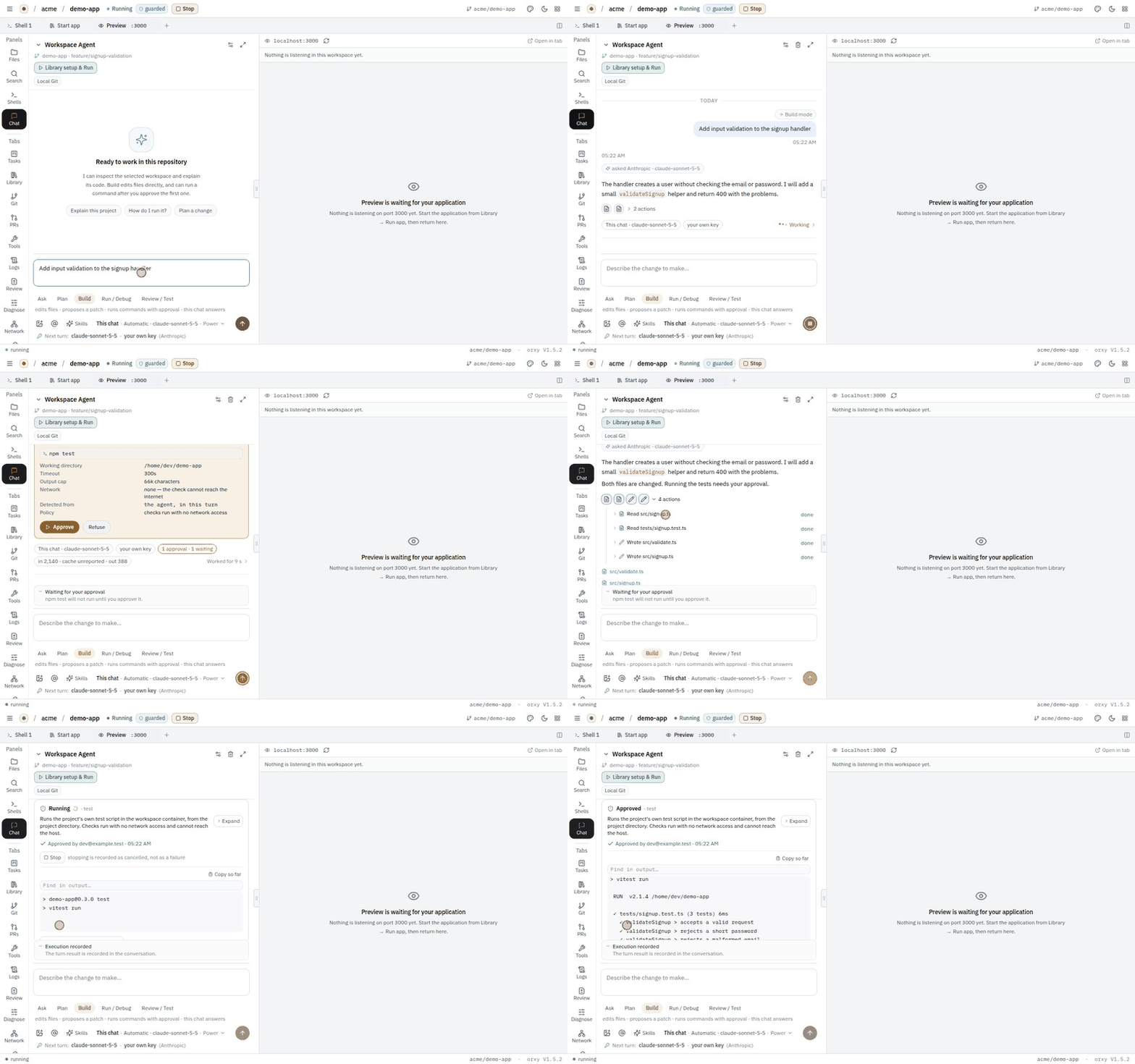
The Workspace Agent in five modes: Ask, Plan, Build, Run / Debug, Review / Test. A turn streams as rows: what it read, what it edited, what it wants to run.

Approvals
Commands wait for you. The card says what will run, where, with what timeout, output cap and network, and records Approve or Refuse. Keep these changes hands the result to Git.
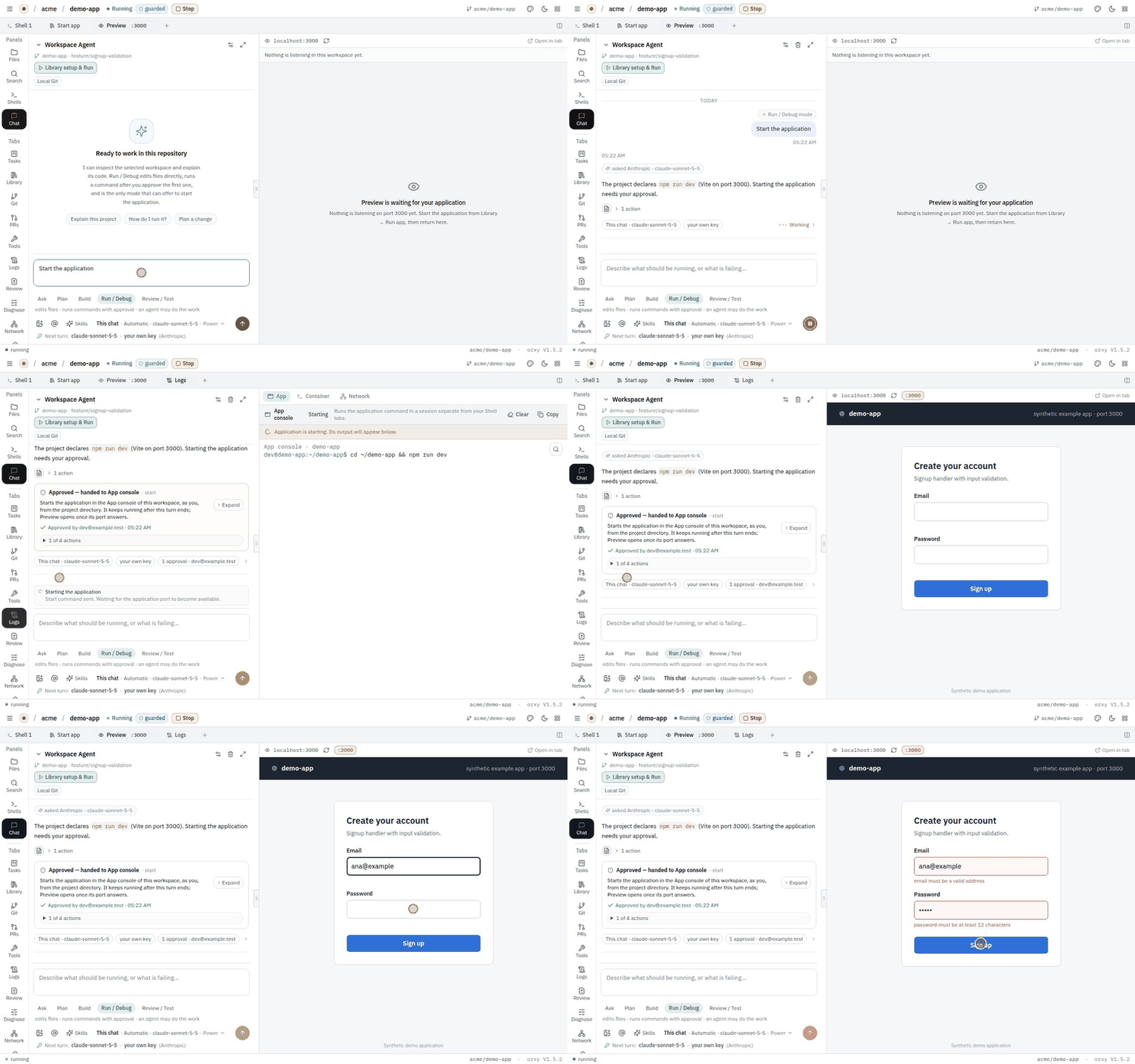
Start the app
Library runs the start command in the App console. A checklist shows the approval, the console, the command and the preview; Preview :3000 then shows the app.

Shell
A terminal in the workspace container. In this demo it is scripted: a few commands answer, the rest tell you what to try.

Files
The project tree, a viewer, and a guarded editor with Edit, Save changes and Discard changes.

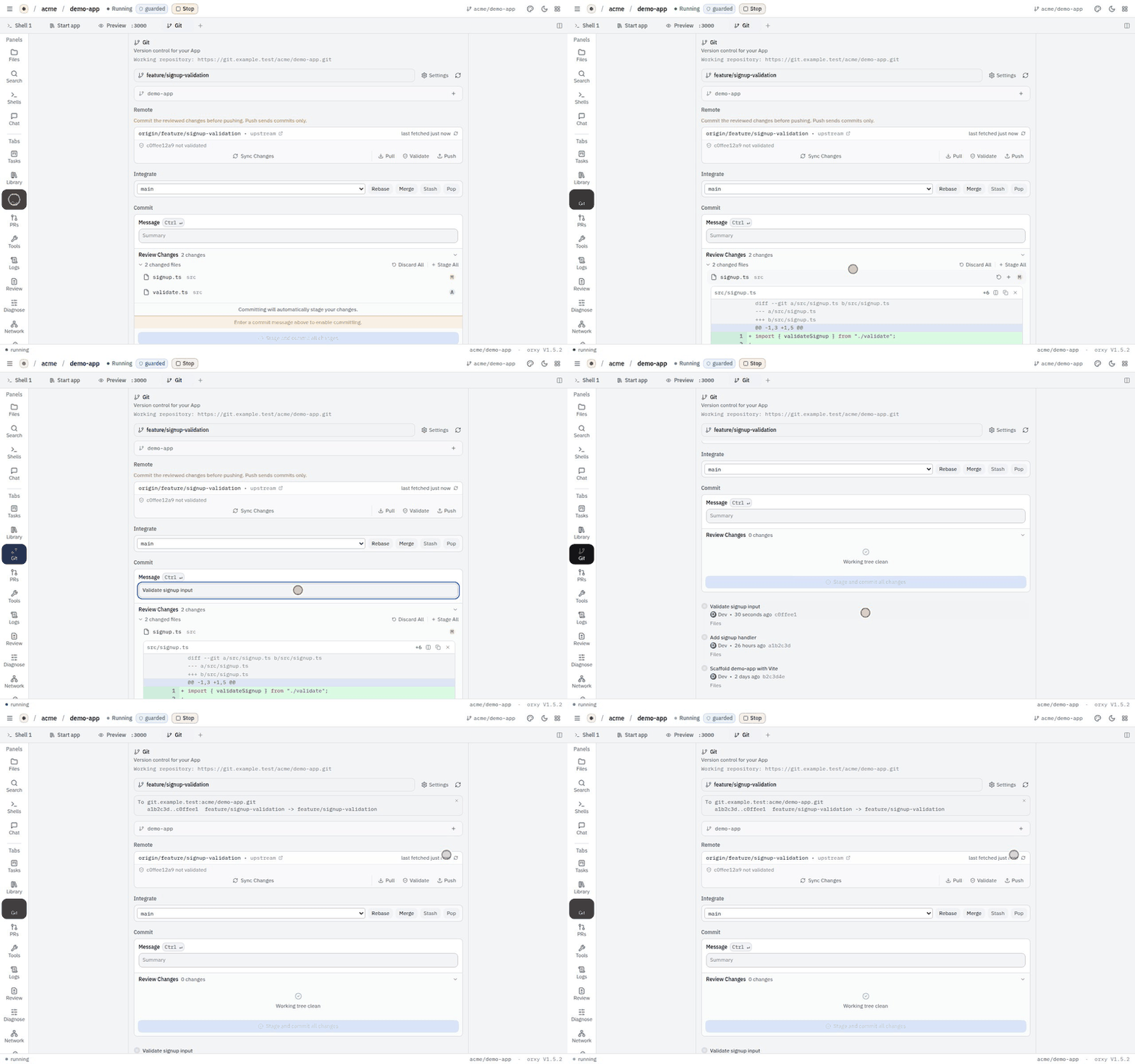
Git and push
Review changes, commit with a message, Validate, Push. The result names who made the tip commit: agent, human-console or unattributed.

Pull requests
Open and merged requests for the repository, their files and review comments, and an Open PR form.

The gate refuses
With the validation gate on (it is off by default), a commit that has not passed the organisation's checks is refused at the broker, with the sentence that says how to fix it.

Logs and egress
The App console, and every outbound request by host with its decision. A denied host offers a request to an administrator.

Admin console
Every workspace on the host, the Create workspace dialog, the Egress monitor, and the Audit log with its Authorship column.


How it connects
Git through the broker, model calls through the model proxy, everything else through the egress proxy and firewall, and all of it into the audit.
What this demo does not show
It is a replica on synthetic data. Here is where it stops.
- No real network. Nothing on this page leaves your browser; the hosts, requests and decisions are synthetic.
- No real model. The agent's turns are scripted. The model name is the one the real app shows; nothing here calls it.
- A scripted terminal and preview. Here and in the recordings, shell output and the preview app are stand-ins.
- Not every console page. Some admin pages are summarised in a sentence rather than recreated.
- No IDE or streamed browser. The code-server tab and the headless-browser tab are described, not embedded.
- acme's settings, not the defaults. Egress ships in
observeand the validation gate is off; acme's admin turned both on. - The record's labels, not its proof. The authorship record is an HMAC on your host, verifiable there and not by third parties, and not yet seen on a live GitHub push.
- Real timings. Delays here are staged; a real host's depend on its hardware.
Now run the real one
One host, your hardware, your repositories. Or talk to us about a pilot.