A one-minute film: the problem, then a tour of Kodela with Anta, a small ant-robot guide. Music, no narration. The scenes:
Your AI helper writes code all day. Whose keys is it holding? Where is your code going? Which lines did it write? If you can’t say, that’s the problem.
Kodela: a workspace your company runs on its own computers, where people and their AI helpers write code.
A workspace for everyone. Each developer gets one, with their AI helper working inside it. It runs on your company’s own server, and on members’ computers if you allow it; nothing is hosted, and there is no sign-up.
It asks before the big moves. Before sending code or touching anything live, the AI asks a person. Out of the box it asks only for those big moves, in Kodela’s chat; you can make it ask more often. Shown in the real app with synthetic data.
You decide where it goes online. Your company picks which sites and services it may reach. Out of the box, Kodela watches and records; blocking starts when you switch it on.
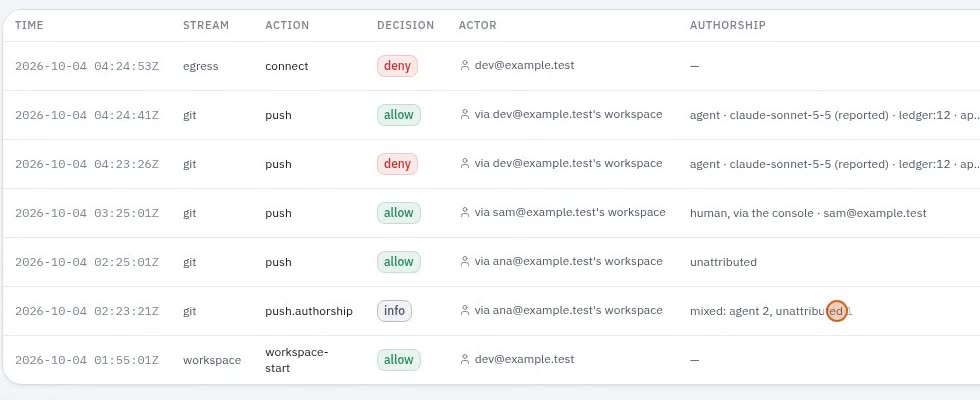
See who wrote what. Code that is sent off is labelled: the AI, a person working in Kodela, or “can’t tell”. Never guessed as human. Kodela can only label what it saw being made. Shown in the real app with synthetic data.
Nothing goes out untested, if you want. You can require code to pass your checks first. This check is off until you turn it on.
Everything leaves a trail. Starts, stops, approvals and refusals, logged for your administrators to review. Kept as long as your company sets; it covers what passed through Kodela.
Why it’s better. Keys: usually often on each laptop; with Kodela, kept on your Kodela server, not in the workspace (by default, for Git, Claude and Codex; a looser profile, or a tool someone signs into themselves inside the workspace, keeps its own login there; a member’s own computer stores neither). Where code goes: usually anywhere it can reach; with Kodela, out through one door you control (on your server, watched at first and blocked when you switch it on; members’ own computers are watched, not blocked). Who wrote it: usually anyone’s guess; with Kodela, a label on every push (only what Kodela saw; otherwise it says “can’t tell”).
What leaves the box is your decision. What the agent wrote is a record you keep.
AI agents on your code. Your rules. Your record.
Workspace, exit, approvals and record in one self-hosted platform.
A commit with no host record reads “unattributed”, never “human”.
Kodela gives every developer and AI agent a workspace on hardware you own. What leaves goes through one proxy you control, the agent asks first as often as you decide, and every push through Kodela says whether an agent wrote it, a person did, or the host does not know.
Ubuntu 24.04, Docker, Python 3.12. One host to start. Early and self-hosted: no signup, no billing. Read what it does not do yet
The platform runs on one Linux host you own
No GitHub token or Anthropic key inside the container (default profile)
One network per organisation
Hash-chained audit, exported as CEF, LEEF, syslog, JSON or CSV
A workspace for every developer and agent, on a box you already own.
Each person, and each agent working for them, gets a container with a terminal, VS Code in the browser, app preview, a headless browser and the major agent CLIs already installed. Organisations get their own network, their own settings and their own audit trail. You run the host; nothing about your code goes through us.
Agents are already writing your code. Where do they run, and what can they reach?
Most teams start the same way: an agent on a laptop, using the developer’s own tokens, on a network that lets anything out. It works, and then someone asks three questions nobody can answer: what did the agent send out, which commits did it write, and who approved it.
Withouta laptop, a token, many ways outtokenWith Kodelaa workspace, a broker, one way outtoken on the host
One path, every time.
You sign in to your own console.
Your host, your accounts: a password, or your organisation’s SSO.
You open a workspace.
A container on your organisation’s own network, with your editor, your terminal and the agents already signed in through the host.
The agent works inside it.
It reads, edits and runs. Anything your organisation marked “ask first” stops at an approval card.
Anything leaving goes through the host.
Git through the broker, model calls through the model proxy, everything else through the egress proxy, and each one written to the audit trail. (On a member’s own computer, if your organisation turns that on, only the broker calls are seen.)
The traffic the host carries, on a scope and a map at once. Every spike on the trace is a connection on the map. Turn a knob and both retune; tap a spike to follow its connection, or tap a device to find its spikes.
github.comallowlistedregistry.npmjs.orgallowlistedpypi.orgallowlistedapi.anthropic.comvia claude-proxypaste.example.netnot on the allowlist203.0.113.9raw IP
Observe mode: the proxy decides, logs, and lets the connection through. A raw IP never gets that far: the firewall drops it.
Front door
TLS is yours. Put a TLS front end in front of it.
Workspace
A Docker container, not a VM.
Egress
Starts in observe. Deny is one setting.
Audit
Tamper-evident, not tamper-proof against host root.
Worker host off by default
Multi-host is built and off. There is no HA.
Everything on this bench is synthetic traffic, drawn to show the mechanism.
The firewall is not the allowlist: it makes the proxy unavoidable, and the proxy decides which hosts pass.
The validation gate is off by default. With no approved check it refuses every push, and it has not yet been recorded on a live GitHub push.
Four things Kodela does, and the one thing each does not.
Git broker · authorship
a41f9c2human-consolesigned
7be0d13agentsigned
c2e88f0unattributedsigned
Validation gate off until an org admin turns it on
Egress proxy
github.comallowed
registry.npmjs.orgallowed
paste.example.netobserved
203.0.113.9:443dropped
synthetic hosts
Organisation networks
acme
globex
initech
no route
one network per organisation · synthetic names
Agent profile
supervised
assisted
autonomous
default
assisted
turn caps
lowered per org, never raised
floor
operator-set
push and PR
off until enabled
Audit log
#…3f1#…a07#…c55#…19e
CEF · LEEF · JSON · CSV · syslog
acme
globex
no route
The box.
A container per person or agent, with its own network per organisation, a terminal, VS Code, preview, a browser and the agent CLIs.
Each workspace runs as a non-root user with no sudo, capped at 2 GB of memory, 2 CPUs and 512 processes, and suspends after 30 minutes idle. A workspace is created only when the firewall has verified its organisation’s network.
Containers share the host kernel.
No capability drop, custom seccomp, read-only root or user-namespace remapping yet.
Git through a broker that holds the token. Model calls through a proxy that holds the key. Everything else through one egress proxy and a fail-closed firewall.
The firewall makes the proxy unavoidable: raw IP addresses and anything that ignores the proxy settings are dropped. The proxy decides which hostnames pass, and each organisation’s DNS filter refuses names you have not allowed.
Enforcement
Logs and lets it through, so you see what your team reaches before you break their build.
Egress logs before it blocks: you promote observe to deny when the log looks right.
Some paths are still open, including npm publish and some AI provider APIs. We list them.
Every push is labelled agent, console or unattributed. Identity, workspace, policy, git and egress events are hash-chained and exportable to your SIEM format.
The host records where each commit made through Kodela came from, and every push the broker allows names its tip’s author. A commit with no host record reads unattributed, never human. The audit log is SHA-256 hash-chained, audit-log verify names any break, and it exports CEF, LEEF, syslog, JSON and CSV.
The label is signed on your host, not publicly verifiable. Nothing ships off the box for you.
The authorship record has not yet been recorded on a live GitHub push.
VS Code in the browser with the extensions your team already uses, as many shells as you need, preview that keeps hot reload working, and Claude Code, Codex and Antigravity signed in by the platform. When your organisation allows it, attach your desktop VS Code or JetBrains IDE over an ssh tunnel that checks a 12-hour token on every connection.
Browser terminal
a real shell in your own container, with shells as tabs
Browser VS Code
pinned Open VSX extensions, Claude Code in the editor
App preview
hot reload keeps working behind the front door
Agent CLIs
Claude Code, Codex and Antigravity, signed in by the platform
Desktop IDE attach
VS Code or JetBrains over ssh; off until an admin turns it on
acme/dev01 · shell 1synthetic
dev@dev01:~/app$ claude -p "run the tests"Running npm test… 42 passed, 0 failed.through the host’s model proxy
Desktop attach ships off. The image carries Node and Python; Go, Rust, Java, .NET and Deno versions are added on demand, downloaded by the host with the vendor’s checksum checked.
Claude now works in desktop-attached sessions. Desktop attach bypasses the file-transfer rule, and your admin sees that warning before turning it on.
Workspace secrets you add are visible inside the container as environment variables.
Nothing here depends on trusting the workspace.
Under the default profile the container holds no GitHub token and no Anthropic key: brokers on the host do (brokering for other providers is partial; see the known gaps). Each organisation gets its own Docker network, a firewall that fails closed, and a DNS filter that refuses names you have not allowed. And we publish the ways out we have not closed yet.
One Linux host with Docker runs the whole platform: the console, the workspaces, the brokers, the firewall. If an operator grants it and your organisation turns it on, a member’s own computer can host their workspaces too; there, egress is observed, not enforced. The control store is a single file you back up with an encrypted command. Model calls go from your host to your provider, with your own API keys.
One host. No high availability. TLS comes from your front end or tunnel.
There is no hosted version. If you need one, tell us: it decides what we build next.
The code is shared with pilot teams on request. We will say here if and when that changes.
about 2 GB RAM, plus about 1 GB for the browser IDE
For larger organisations: what exists, and what does not yet.
Per-organisation SSO with Entra ID, Google Workspace or any OIDC provider (built, not yet tested against a customer’s live identity provider); four roles including a read-only auditor; strictest-wins policy; SIEM-format export; an evidence report mapped to ISO 27001, SOC 2 and NIST 800-53. Not built yet: SAML, SCIM, native MFA, high availability, organisation deletion, a support SLA.
GitHub (App) · Anthropic · OpenAI-compatible APIs · Google Gemini · Microsoft Entra ID · Google Workspace · any OIDC provider (SSO not yet tested against a live IdP) · Cloudflare Tunnel · SMTP · Open VSX · SIEM via CEF, LEEF and syslog
Off by default: an operator grants it, then your organisation turns it on. Egress and DNS there are observed, not enforced, and Docker is not available. Tested end to end on Windows only.
Additional worker hosts
Built, off by default, not yet recommended for production.
Air-gapped
Partial: everything is pinned and checksummed and images move with docker save; there is no offline bundle yet.
Pricing is per active developer, never per agent, and never for a control: the audit trail, the authorship record and every security setting are in Community too.
Prices for the paid editions are to be announced. Pilots are quoted individually.
TeamTo be announceda support channel and upgrade help
BusinessTo be announcedpriority support and an evidence pack
EnterpriseTo be announcedlicence terms, MSA and DPA
Questions
What is Kodela?
Kodela is a self-hosted workspace platform for developers and their AI agents. Each developer gets a container workspace, with their AI agents working inside it, plus a terminal, VS Code in the browser, app preview and the Claude Code, Codex and Antigravity CLIs. On your host, its traffic leaves through one egress proxy per organisation, a broker on your host holds the GitHub key, and every push is labelled agent, console or unattributed. The platform runs on a Linux host you own; workspaces can also run on members’ own computers, where some controls are observed rather than enforced.
Where does my code live?
In workspace volumes on your host, and in your git host. If your organisation turns on members’ own computers, also on that member’s disk, where whoever uses it can read it.
Can the agent send my code somewhere?
Everything leaves through one proxy you control. It starts in observe mode, which logs and allows, so switch to deny when you have seen the traffic. Some paths are still open, and we list them.
How do you know which commits an agent wrote?
The host records each commit made through Kodela as agent or console. The push is labelled from that record, and anything the host did not see is labelled unattributed.
Is it open source?
Not today. Pilot teams can read the code.
Is there a hosted version?
No. You run the Kodela platform on a Linux host you own, with Docker and systemd, and members’ computers can host their own workspaces. There is no hosted version and no hosted console to sign in to.
What does it cost?
Community is free. Prices for Team, Business and Enterprise are to be announced; until then, pilots are quoted individually. Compare the editions.
The list we would want to read first.
What this does not do yet, on the page, not in a footer. All known gaps
Egress starts in observe: it logs and allows until you switch it to deny.
npm publish can still upload to the npm registry.
Some AI provider APIs are reachable directly.
Copy tools hidden inside an ordinary HTTPS connection to an allowed site are an egress-allowlist question, not a file-transfer one. (ssh, rsync and ftp on any other port are now refused.)
Workspaces are containers, not virtual machines.
The audit trail and authorship record trust your host’s root user, and nothing ships them off the host for you.
The validation gate and the authorship record have not yet been recorded on a live GitHub push.
Single sign-on has not been tested against a customer’s live identity provider; there is no SAML, SCIM or native MFA.
One host, no high availability, no scheduled backup, no organisation deletion.
Mail is off until you configure SMTP; invitations can be handed over by link.
On a member’s own computer, egress is observed, not enforced, DNS is not filtered, and the source on its disk is readable.
Run it on your own hardware. Read the gaps first.
Repository access on request.
If a claim on this page does not match what the code does, the code is right and the page is a bug.
Write to contact@kodela.app. Pilots are for teams willing to be early, which means you accept everything on the list above.
SELF-HOSTED AGENT PLATFORM / 01
AI agents on your code. Your rules. Your record.
One self-hosted platform for developers and AI agents: a workspace each, one way out that you control, approvals you set, and a record of every push. On hardware you own.
! Observe mode logs and allows. Switch to deny when you’re ready.
NO CLOUD CONTROL PLANEYOUR HOST / YOUR RULES
An illustrative control path. Not a live system status.
01
Runs on one Linux host you own
02
No hosted console or managed control plane
03
Every push is labelled, or left unattributed
THE PLATFORM / 02
Give every person and agent a place to work.
A container per developer or agent, on your organisation’s network. Terminal, browser IDE, app preview and agent CLIs are ready inside. Your host keeps the settings, keys and audit trail.
A commit the host did not see stays unattributed, never “human”.
YOUR HARDWARE / 04
On a box you already own.
One Linux host with Docker runs the platform: console, workspaces, brokers and firewall. Model calls go from your host to your provider. Your code does not pass through us.
In workspace volumes on your host and in your git host. If your organisation enables workspaces on members’ own computers, source is also on that member’s disk and readable by whoever uses it.
Can an agent send code somewhere?
Traffic leaves through a proxy you control. It starts in observe mode, which logs and allows. Switch to deny after reviewing traffic; some paths remain open and are listed in the known gaps.
How do you know who wrote a commit?
The host records commits made through Kodela as agent or console. Anything the host did not see is labelled unattributed.
Is there a hosted version?
No. You run Kodela on a Linux host you own, with Docker and systemd. There is no hosted version and no hosted console.
What does it cost?
Community is free. Paid edition pricing is to be announced; pilots are quoted individually. Compare editions.
Is Kodela open source?
Not today. Pilot teams can read the code on request.
KODELA / YOUR HOST
Run it on your hardware. Read the gaps first.
If a claim here disagrees with the code, the code is right and the page is a bug.